Locked Pages
The lock icon ( ) designates links that are accessible only to personnel
with SLAC IDs. Inside SLAC, a "pass-through" identification is
used so your account is automatically verified. ) designates links that are accessible only to personnel
with SLAC IDs. Inside SLAC, a "pass-through" identification is
used so your account is automatically verified.
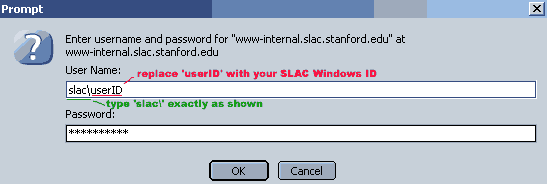
If you are logging in from outside SLAC with an
Internet Explorer browser, the internal pages will need ID
verification to log in and view the pages. However, you
will need to type "slac\" and then your userID, so it looks like "slac\JohnDoe".
(Typing the userID alone will return an error message.)
If you are logging in with a FireFox browser, userID alone
will work (FireFox does not require the "slac\" in the prompt).
If you have a SLAC ID, and are having difficulties logging in
using the above instructions, please email
esh-web@slac.stanford.edu.
For more information on accessing pages on the SLAC Web site, see: Computing: Getting Started
|

