Security Links
Public
SLAC Internal
Security Assistance
osimon@slac.stanford.edu
Main Gate
650-926-2551
24 hrs./day
365 days/year
SLAC Subcontractor Badging Process
Obtaining a SLAC Badge
Step 1: Site Access Form
All individuals coming to SLAC must enter their personal information into the Non-Employee registration form. If you are foreign national and will be performing work, additional documentation will be required. Please check with your Project Manager if you
have any questions about the process.
The contract should be approved through SLAC Purchasing before the
onboarding process can begin. Check with your Project Manager
if there are any quesions about timing.
Note: There is no way to save a form in progress. Please have all your information ready ahead of time. See the
How to Submit a SLAC Site Access Portal Form instructions for details.
-
Fill out the
SLAC Site Access Form (form will open in new window)
.
-
All fields with an * are required. Complete all required fields.
.
-
Form example:
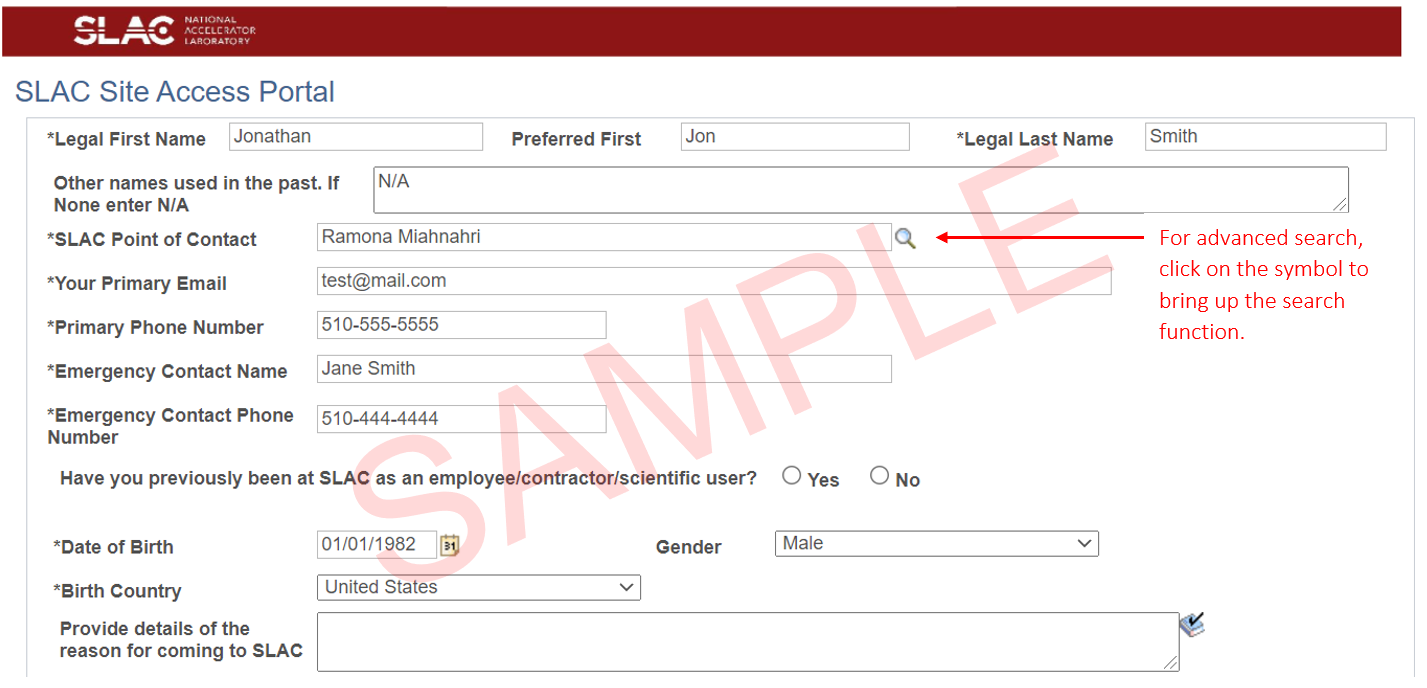
- click for larger image of the form example
.
- The Point of Contact should be the Project Manager, or
similar SLAC function, who will approve this form before HR will
process it.
.
- If you are a foreign national not from the United States,
you will be required to have additional documentation - some to
upload while filling out the form, some to present when you
check in at SLAC. See the
instructions
for what to upload. See
Documents Required for Check-In for the others.
Step 2: Getting the SLAC ID number
Once the form above is filled out, the system will go through the processing
of the information and entry into the database. Once approved by
the Point of Contact, the subcontractor and the Point of Contact will receive an
automatic email with the person's SLAC ID number.
NOTE: SLAC requests at least 24 hours to
process ID numbers. If the ID is not accessible within 24 hours after activation or for urgent matters, call
Ramona Miahnahri for assistance.
People must have a SLAC System ID Number to
access the Web Training Portal: Obtain your SLAC System ID Number from your supervisor or SLAC Point of Contact. In the event they are not able to provide this information, contact
the IT Service Desk.”
Step 3: Take SLAC Training
Training MUST be completed by each individual subcontractor who will be working on site.
The training is web based. To access the training, please follow the steps below:
- You must have your SLAC system ID number issued to you before you begin.
(see Step 2 above)
- From outside the SLAC Network you can have a password emailed to you. Email
training-support@slac.stanford.edu with "Training Portal Password Request" in the subject field.
- Include your full name, SLAC system ID # and the name of your SLAC contact in the body of the message.
- Go to the
Web Training Portal entry web page. Read the computer
requirements and browser recommendations on this page.
- Click the red box on the right side for "Manual Login" to access the log-in page where you will enter your system ID number and your password.
- Access the Course Catalog to find the courses you want to take using the Learning Search function.
-
Construction Safety Orientation (#375) (All construction subcontractors at SLAC must take this course, which is also available in Spanish)
-
ES&H Orientation (#219) (All non-SLAC employees who are not involved in construction must take this course)
- Enter the name or number of the course you need in the search box at the top to find your training.
- Click the launch button on the training info page.
- Once you have completed the courses, print your certificates of completion!
.
Take the certificates with you to get your badge.
.
Step 4: Get Badge
- You and your SLAC Point of Contact will both need to
come to the SLAC Security Office to fill out the badging
form and the SLAC POC to sign it.
- Security office hours are 7:00am to 7:00pm, Monday through Friday.
- The Security Office is located in VUE Center (Visitor,
User, Employee) located in building 53 (SUSB). The
building is directly behind main gate as you come in.
The VUE Center is on the first floor, on the left side
as you come in the building.
- Determine with your SLAC contact if you will require
a dosimeter while on the job. If so, you will need to
complete section 3 and (if applicable) section 4, and
take the required training for it.
- If you have completed all required training, the
badging process should take no more than 15-20 minutes.
If you need training, please allow 2-3 hours for it
prior to badging (your SLAC POC does not need to be
present for training, only to sign the badge form).
- In accordance with ESH Manual Chapter 13, Traffic and Vehicular Safety, a valid drivers’ license is required prior to the issuance of a badge if you intend to operate a motorized vehicle on the SLAC site.
.
- Bring a valid picture ID (a State ID or Driver's License) to
present to the badging officer to pick up the badge.
.
Step 5: After-hours and Weekend work
If a subcontractor will be working After Hours or on
weekends, then a special
Subcontract After-Hours Form  needs to be filled out and the FCM on site during those times.
.
|

